
Building an AI-Powered Learning Management System in 7 Days
- ai
- nextjs
- sanity
- mux
- education
- buildinpublic
Building an AI-Powered Learning Management System in 7 Days
A comprehensive technical breakdown of creating a modern learning platform with AI tutoring, secure video streaming, and real-time content management
Introduction
The educational technology landscape is evolving rapidly. Traditional Learning Management Systems with static content and basic video playback no longer meet modern learner expectations. Today's students expect personalized experiences, intelligent assistance, and seamless interactions across devices.
This article documents the complete development of LMS with AI—a production-ready learning platform built in seven days using modern web technologies. This is a deep technical dive into building a scalable SaaS platform that combines real-time content management, secure video streaming, tiered subscriptions, and AI-powered assistance.
What We're Building
LMS with AI is a full-featured learning platform with:
Core Features
🤖 AI-Powered Tutor Assistant
An intelligent conversational agent that searches through course content, answers student questions, and provides direct links to relevant lessons. Powered by OpenRouter and equipped with tools for real-time course queries.
🎥 Professional Video Streaming
Secure, adaptive video playback using Mux. Features include signed playback URLs, auto-generated captions, thumbnail previews, and storyboard scrubbing—all protected behind authentication.
📚 Hierarchical Content Structure
Organized learning paths with Categories → Courses → Modules → Lessons. Each level supports rich metadata, progress tracking, and access control.
💳 Tiered Subscription System
Three access levels (Free, Pro, Ultra) with Clerk-powered authentication and subscription management. Content is gated based on user subscription tier.
📊 Progress Tracking
Per-user completion tracking for both courses and individual lessons. Server-side validation ensures data integrity.
🎨 Modern UI/UX
Beautiful dark theme with gradient effects, smooth animations, and fully responsive design. Built with Tailwind CSS v4 and shadcn/ui components.
⚡ Real-Time Content Updates
Live queries from Sanity CMS ensure content changes appear instantly across all users without page refreshes.
Tech Stack Overview
- Framework: Next.js 16 (Server Components, streaming RSC, excellent performance)
- UI Library: React 19 (Latest concurrent features and improved hooks)
- CMS: Sanity.io (Real-time collaboration, structured content, powerful queries)
- Query Language: GROQ (Graph-relational queries that fetch exactly what you need)
- Authentication: Clerk (Production-ready auth with subscription tier management)
- AI Integration: OpenRouter + AI SDK (Multi-model access with tool-calling capabilities)
- Video Infrastructure: Mux (Secure streaming, auto-captions, adaptive bitrate)
- Styling: Tailwind CSS v4 (Rapid development with utility-first approach)
- Type Safety: TypeScript (Catch errors early and improve maintainability)
- Components: Radix UI + shadcn/ui (Accessible primitives and pre-built components)
- Validation: Zod (Runtime validation for API contracts)
System Architecture
The platform follows a modern full-stack architecture:
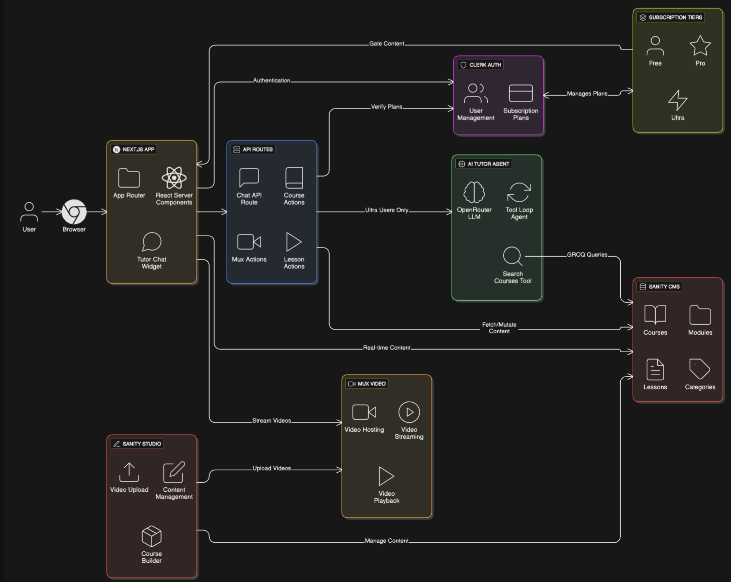
┌─────────────────────────────────────────────────┐
│           Next.js 16 App Router                 │
│        (Server Components + RSC)                │
├─────────────────────────────────────────────────┤
│                                                  │
│  Course Browser → Lesson Player → Dashboard    │
│                                                  │
├─────────────────────────────────────────────────┤
│                                                  │
│              🤖 AI Tutor System                 │
│  • OpenRouter + AI SDK                          │
│  • Tool Loop Agent Pattern                      │
│  • GROQ-powered Course Search                   │
│  • Streaming Chat Interface                     │
│                                                  │
├─────────────────────────────────────────────────┤
│                                                  │
│  Sanity CMS  │  Clerk Auth  │  Mux Video       │
│                                                  │
└─────────────────────────────────────────────────┘
Data Flow:
- User authenticates via Clerk
- Server Components fetch content from Sanity
- Client receives HTML with embedded data
- Interactive elements hydrate progressively
- Real-time subscriptions keep content fresh
- AI tutor queries Sanity via server-side tools
- Videos stream from Mux with signed tokens
.png)
The 7-Day Build Journey
Day 1: Foundation & Infrastructure
Goal: Establish the core architecture and essential services
What Got Built:
- Next.js 16 project with App Router and TypeScript
- Clerk authentication with OAuth (Google, GitHub)
- Sanity.io workspace setup and configuration
- Landing page with Hero, Pricing, and CTA sections
- shadcn/ui component library integration
- Custom dark theme with Tailwind CSS v4
- Fully responsive layout system
Key Decision: Starting with authentication and CMS configuration meant zero rework later. Many projects fail because they bolt on these systems as afterthoughts.
Why Clerk over NextAuth?
Clerk provides built-in subscription management, better UX for social logins, and production-ready session handling without complex configuration.
Why Sanity over Contentful/Strapi?
Sanity's real-time collaboration, GROQ query language, and embedded Studio make it ideal for educational content with complex relationships.
Day 2: Content Architecture & Video Integration
Goal: Build the content hierarchy and integrate video infrastructure
What Got Built:
- Sanity schema design (Category, Course, Module, Lesson)
- Mux video plugin integration for uploads
- Content relationships and references
- Course cards with live data rendering
- Statistics display (course count, lesson count)
- Sample content import for testing
Content Model Design:
.png)
The platform uses a hierarchical structure:
- Category → "Web Development", "Data Science"
- Course → Title, description, tier, thumbnail
- Module → Logical grouping of lessons
- Lesson → Video content, rich text, completion tracking
Each level has specific validation rules and metadata that make content management intuitive while keeping queries efficient.
Mux Integration Benefits:
Mux handles the complexity of video infrastructure:
- Direct uploads from Sanity Studio
- Automatic transcoding to multiple formats
- Adaptive bitrate streaming for all devices
- Auto-generated English captions
- Secure signed playback URLs
- Built-in analytics and monitoring
This eliminates the need to build custom video processing pipelines or manage CDN configurations.
Day 3: Monetization & Access Control
Goal: Implement subscription tiers and payment processing
What Got Built:
- Pricing page with tier comparison table
- Clerk subscription plans configuration
- Server-side access control functions
- Content gating middleware
- Checkout flow with error handling
- Subscription status UI components
Subscription Tier Structure:
- Free Tier: Includes Introductory Courses and Progress Tracking.
- Pro Tier: Everything in Free, plus Premium Courses and Certificates.
- Ultra Tier: The complete package with Advanced Courses and AI Tutor Access.
Access Control Strategy:
Every protected route and component checks user subscription server-side. The system uses Clerk's has({ plan: "tier" }) method to verify access. This approach keeps authorization logic centralized and impossible to bypass from the client side.
Why This Matters:
Client-side checks can always be bypassed. All authorization happens on the server with Clerk's session validation, making the platform genuinely secure.
Day 4: User Dashboard & Discovery
Goal: Build personalized learning experience
What Got Built:
- User dashboard showing active subscription
- "My Courses" section with enrolled courses
- Course search and filtering system
- Category-based browsing
- Progress indicators on course cards
- "Continue Learning" quick access
- Subscription upgrade prompts
Dashboard Features:
The dashboard provides a personalized overview:
- Current subscription tier and benefits
- In-progress courses with completion percentages
- Recently accessed lessons with resume links
- Course recommendations based on tier
- Quick stats on learning progress
Search Implementation:
The search system works client-side with server-fetched data. All courses load initially (server-rendered), then JavaScript enables instant filtering as users type. This progressive enhancement approach means the page works even if JavaScript fails.
Performance Benefit:
No loading spinners on navigation. The entire interface feels instant because all data is pre-loaded.
Day 5: Course Pages & Progress System
Goal: Complete the core learning flow
What Got Built:
- Dynamic course detail pages with module structure
- Accordion-style module navigation
- Lesson lists with completion indicators
- Server actions for progress tracking
- Content gating for premium material
- "Mark as Complete" functionality
- Optimized URL structure for SEO
Course Page Structure:
Each course page displays:
- Course header with title, description, and tier badge
- Overall progress bar showing completion
- Expandable modules containing lesson lists
- Lock icons on gated content
- Visual completion checkmarks
Progress Tracking System:
The platform tracks completion at two levels:
- Lesson Completion: Individual lessons maintain a
completedByarray with user IDs - Course Completion: Automatically calculated from lesson completion status
Server actions handle all mutations, ensuring data integrity and proper cache invalidation. When a user marks a lesson complete, the dashboard and course pages update automatically.
Why Server Actions:
Server actions eliminate the need for separate API routes, provide automatic type safety, and integrate seamlessly with Next.js's caching and revalidation system.
Day 6: Secure Video Streaming
Goal: Implement production-ready video system
What Got Built:
- Secure video upload workflow
- JWT-based signed playback tokens
- Time-limited access (1-hour expiry)
- Professional Mux player component
- Thumbnail and storyboard support
- Auto-generated subtitle integration
- Loading and error states
Video Security Architecture:
The platform uses a three-layer security approach:
1. Signed Playback Policy
Videos require valid JWT tokens signed with RSA private keys. Mux validates the signature before serving content.
2. Time-Limited Access
Tokens expire after 60 minutes. The client automatically refreshes tokens, but there's no way to create permanent access URLs.
3. Server-Side Generation
Private keys never leave the server. Tokens are generated on-demand for authenticated users only.
How It Works:
When a user opens a lesson:
- Client requests video tokens from server
- Server validates authentication and subscription
- Server generates JWT tokens for playback, thumbnail, storyboard
- Tokens are returned to client
- Mux player uses tokens to stream video
- Tokens expire after 1 hour
Security Benefits:
- Videos can't be accessed without authentication
- No permanent URLs can be shared
- Tokens are user-specific and time-limited
- Private keys remain secure on server
Auto-Generated Captions:
Mux automatically creates English captions for all uploaded videos. Content creators don't need to manually create or upload subtitle files—accessibility is built-in from day one.
Day 7: AI Tutor Integration
Goal: Add intelligent assistance to enhance learning
What Got Built:
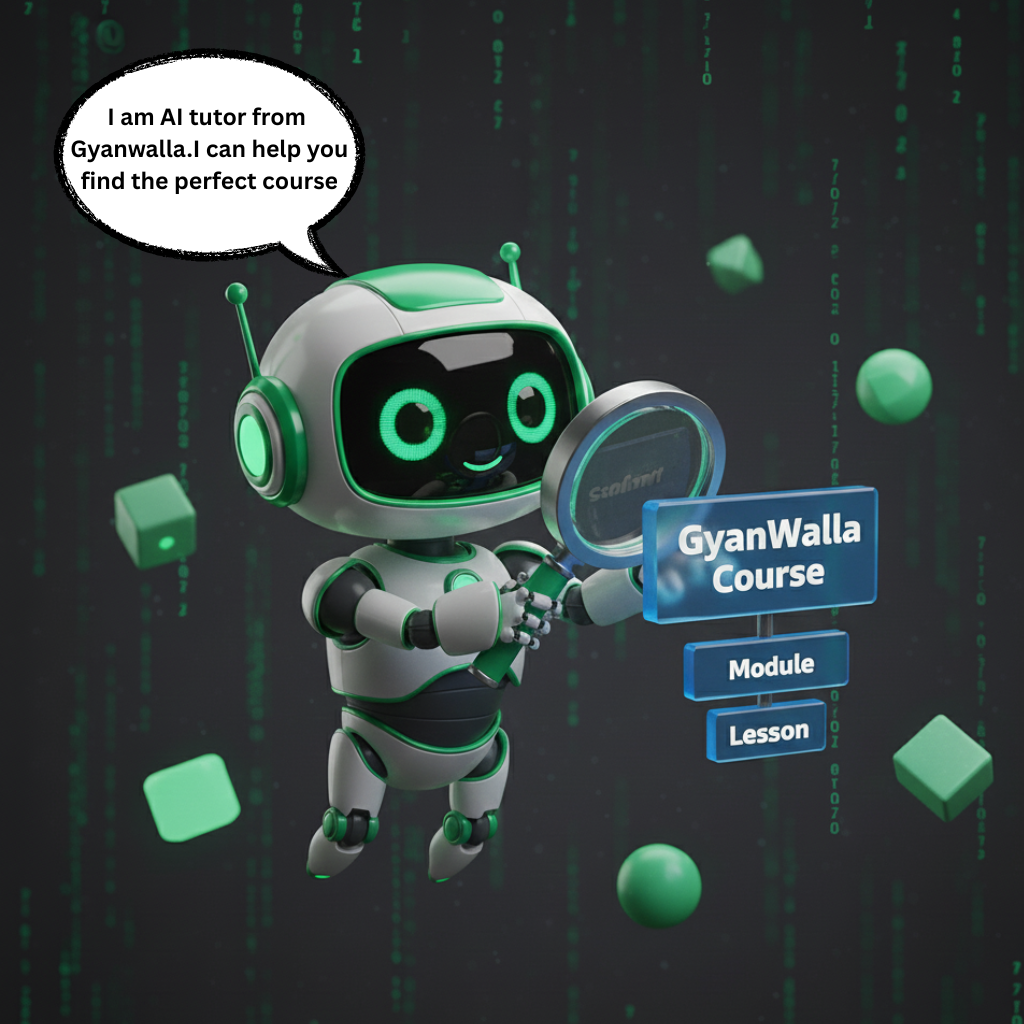
- AI tutor widget with floating interface
- OpenRouter API integration
- Tool-equipped agent for course search
- Content-aware response generation
- Direct lesson linking in responses
- Streaming chat with message history
- Ultra-tier access requirement
AI Architecture:
The tutor uses Vercel's AI SDK with a "tool loop agent" pattern. This architecture allows the AI to:
- Decide when it needs additional information
- Call tools to search course content
- Process tool results
- Generate helpful responses with context
How The AI Tutor Works:
- Student asks question: "How do I learn React hooks?"
- Agent evaluates need: Determines it needs course data
- Tool executes: Searches all courses/lessons via GROQ
- AI receives results: Gets course titles, descriptions, lesson content
- AI generates response: "I found our React Fundamentals course! The 'Understanding Hooks' lesson covers useState, useEffect, and custom hooks..."
- Student clicks link: Direct navigation to relevant lesson
The Course Search Tool:
The search tool is the AI's gateway to course content. It queries Sanity in real-time, searching through:
- Course titles and descriptions
- Module titles
- Lesson titles and descriptions
- Full lesson content (extracted from rich text)
Content Extraction:
GROQ's pt::text() function extracts plain text from Portable Text (rich text) content. This makes entire lessons searchable by the AI, enabling it to reference actual course material when answering questions.
Why This Approach Works:
Unlike traditional chatbots that hallucinate or provide generic responses, this AI is grounded in the platform's actual content. It can only reference courses and lessons that truly exist, and it provides direct links for immediate access.
Example Interaction:
Student: "I want to build a full-stack app"
AI Process:
- Calls course search tool with query
- Finds "Full Stack Next.js" course
- Identifies relevant lessons on backend, database, deployment
AI Response:
"Perfect! Our 'Full Stack Next.js' course covers everything you need. It includes backend API development, database integration with Prisma, and deployment to Vercel. The course is available on the Pro tier. [View Course →]"
Deep Dive: Sanity CMS Integration
Sanity.io is the content backbone of this LMS. Understanding how to leverage its capabilities is crucial for building scalable educational platforms.
Why Sanity for Educational Content?
Real-Time Collaboration:
Multiple instructors can edit courses simultaneously without conflicts. Changes sync instantly across all editors.
Structured Content:
Define exactly how courses should be organized with TypeScript-enforced schemas. No arbitrary limitations.
GROQ Query Language:
Fetch complex nested relationships in a single query. No N+1 problems or multiple database round trips.
Embedded Studio:
Admin panel lives at /studio in your Next.js app. No separate CMS hosting or domain needed.
Content Lake:
All educational content in one place with full version history. Easy to migrate, backup, or transform.
Portable Text:
Rich text format that's API-friendly and renders consistently across platforms. No HTML parsing nightmares.
Real-Time Updates
The platform uses Sanity's live content API. When an instructor updates a lesson title or publishes a new video, the change is reflected instantly on the frontend using Server-Sent Events (SSE).
Conclusion
Building a production-ready LMS in 7 days is an ambitious challenge, but modern tools make it possible. By leveraging Next.js 16, Sanity, Clerk, and Mux, we built a platform that would have taken months to develop just a few years ago.
Key Takeaways:
- Choose the right stack: Don't reinvent the wheel. Use specialized services for auth, video, and content.
- Server Components are a game changer: They simplify data fetching and improve performance significantly.
- AI needs context: The most useful AI features are those deeply integrated with your application's data.
What's Next?
- Adding quizzes and assessments
- Implementing community features (comments, forums)
- Mobile app development with React Native
The source code for this project is available on GitHub. Check out the live demo to see it in action!