
Building Sarathi - A Technical Deep Dive into Modern Ride-Hailing
- react-native
- expo
- mobile-development
- typescript
- serverless
📖 Introduction
Have you ever wondered what it takes to build a production-ready ride-hailing application from scratch? Not just a proof-of-concept, but a real app with authentication, real-time location tracking, and a seamless user experience across iOS and Android?
This is the story of Sarathi (Sanskrit for "charioteer")—a modern ride-hailing platform built entirely with the Expo ecosystem. This isn't just another tutorial project; it's a complete technical journey that explores the cutting edge of mobile development in 2026.

In this comprehensive breakdown, I'll share the architectural decisions, technical challenges, and key learnings from building Sarathi. Whether you're a seasoned developer or just starting your mobile development journey, you'll find insights into modern app architecture, deployment strategies, and real-world problem-solving.
🎯 Project Overview
Sarathi is a full-stack ride-hailing application that connects riders with drivers for on-demand transportation. Think Uber, but built with modern tools and a focus on developer experience.
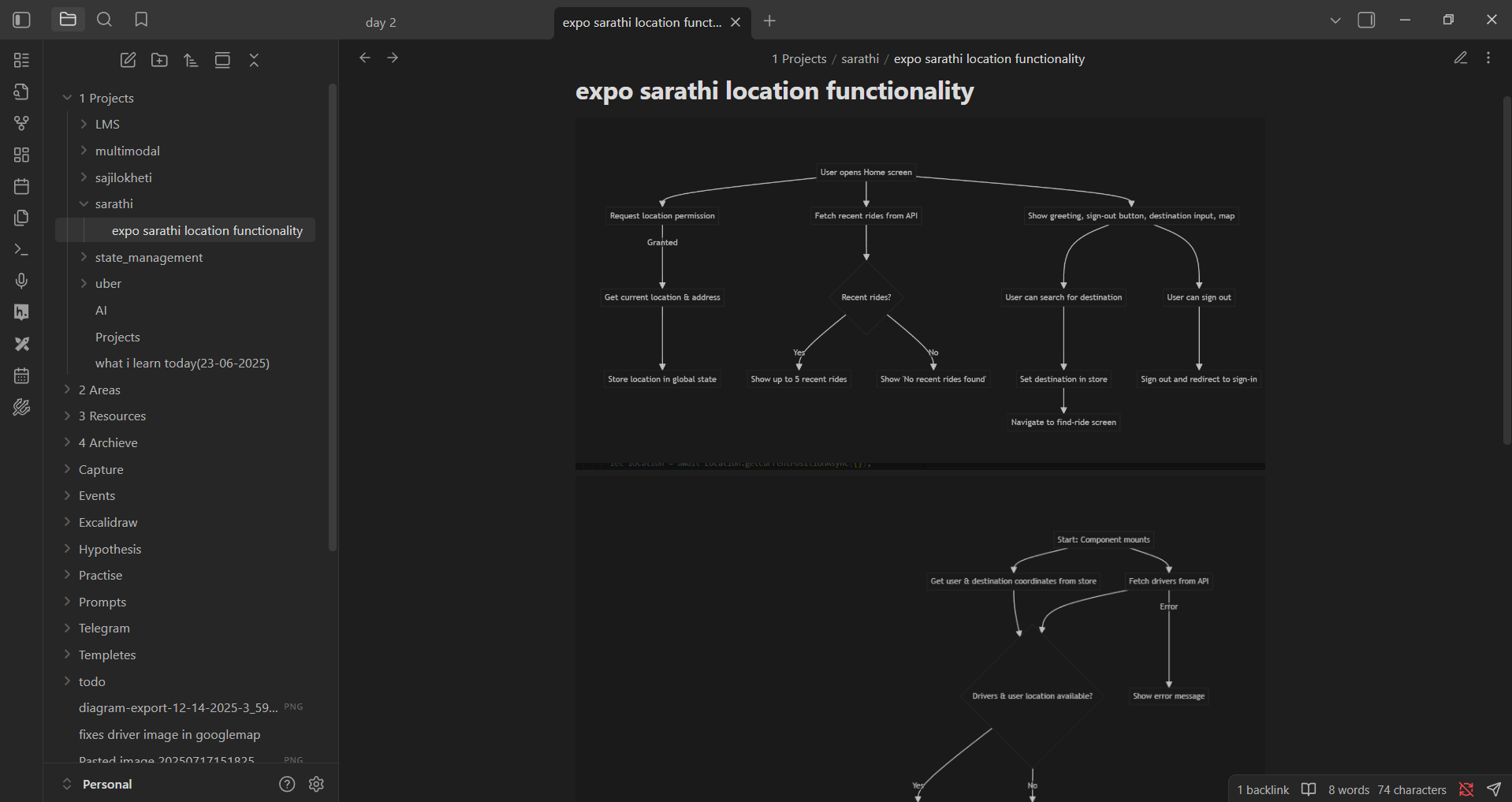
Core Features
- 🔐 Secure Authentication: Clerk-powered auth with Google OAuth
- 🗺️ Interactive Maps: Real-time driver locations with custom markers
- 📍 Smart Location Services: GPS tracking, geocoding, and route planning
- 🚗 Ride Management: Book rides, track progress, and complete journeys
- 📱 Cross-Platform: Native experience on both iOS and Android
- 🔔 Push Notifications: Real-time updates on ride status
- ⚡ OTA Updates: Instant bug fixes without app store delays
The Challenge
Building a location-based app presents unique challenges:
- Managing real-time GPS data without draining battery
- Coordinating complex state across multiple screens
- Integrating multiple third-party APIs (Google Maps, Clerk, Neon)
- Ensuring type safety across a large codebase
- Deploying and updating the app efficiently
Sarathi solves all of these challenges while maintaining a clean, maintainable codebase.
🏗️ Tech Stack & Architecture
The technology choices for Sarathi were deliberate, focusing on developer velocity, type safety, and scalability.

Frontend Stack
- Expo 54 & React Native 0.76: The foundation, providing native capabilities with JavaScript
- Expo Router: File-based routing system (like Next.js for mobile)
- TypeScript 5.3: Comprehensive type safety across the entire codebase
- NativeWind: Tailwind CSS for React Native, enabling rapid UI development
- Zustand: Lightweight state management (3KB!) with minimal boilerplate
Backend & Infrastructure
- Expo Router API Routes: Serverless endpoints defined with
+api.tsconvention - Neon PostgreSQL: Serverless database with edge computing capabilities
- Clerk: Authentication and user management
- EAS (Expo Application Services): Build, deploy, and update infrastructure
External APIs & Services
- Google Maps API: Map rendering for Android
- Apple Maps: Native map experience for iOS
- Google Places API: Location autocomplete and search
- Google Directions API: Route calculation and ETA estimation
- Geoapify: Geocoding (coordinates ↔ addresses)
Development Tools
- EAS Build: Cloud-based native builds
- EAS Update: Over-the-air updates
- expo-image: High-performance image loading and caching
- expo-location: GPS and location services
- expo-notifications: Push notification handling
Architecture Philosophy: The "Unified Monorepo"
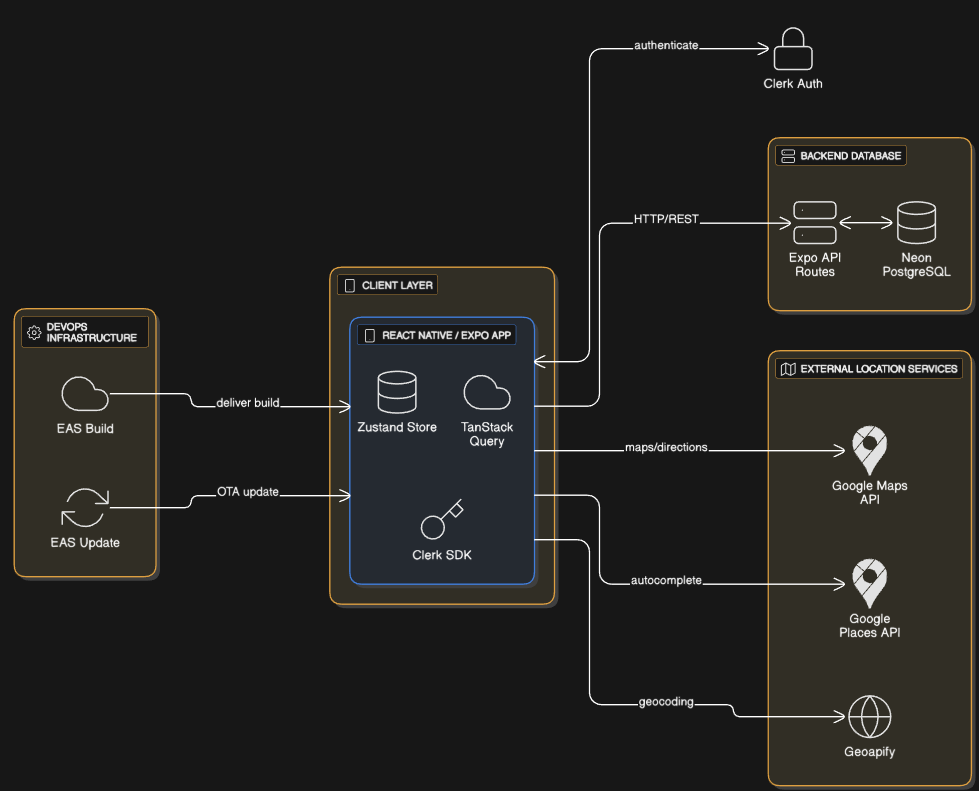
One of Sarathi's most interesting architectural choices is the unified codebase approach. Instead of maintaining separate repositories for the mobile app and backend API, everything lives in one Expo project.
How it works:
- Mobile screens live in
app/(root)/andapp/(auth)/ - API endpoints live in
app/(api)/ - Shared types in
types/type.d.tsare used by both client and server - State management in
store/coordinates the frontend - Utility functions in
lib/are reusable across the app
This approach provides several advantages:
- Type Safety: Frontend and backend share the same TypeScript definitions
- Simplified Deployment: One codebase, one deployment pipeline
- Faster Development: No context switching between projects
- Zero CORS Issues: API routes run in the same origin during development
🎨 Architectural Decisions: Why We Chose What We Chose
Every technology choice in Sarathi was made for a specific reason. Here's the rationale behind the key decisions:
Why Expo over Bare React Native?
Decision: Use Expo's managed workflow instead of bare React Native.
Rationale:
- Faster iteration: Expo provides pre-configured native modules
- EAS ecosystem: Seamless builds and OTA updates
- Expo Router: File-based routing eliminates boilerplate
- Future-proof: Expo 54 includes the new architecture by default
Trade-off: Limited to Expo-compatible libraries, but the ecosystem is mature enough that this rarely matters.
Why Zustand over Redux/MobX?
Decision: Use Zustand for state management.
Rationale:
- Minimal boilerplate: No actions, reducers, or providers
- TypeScript-first: Excellent type inference
- Tiny bundle size: 3KB vs Redux's 20KB+
- Simple mental model: Just hooks and stores
Trade-off: Less ecosystem tooling (no DevTools), but the simplicity outweighs this for our use case.
Why Neon over Traditional PostgreSQL?
Decision: Use Neon's serverless PostgreSQL instead of a traditional database.
Rationale:
- Serverless scaling: Automatically scales to zero when not in use
- Edge computing: Low latency with global distribution
- Developer experience: Instant provisioning, no server management
- Cost-effective: Pay only for what you use
Trade-off: Vendor lock-in, but the DX and cost savings are worth it.
Why Clerk over Custom Auth?
Decision: Use Clerk instead of building custom authentication.
Rationale:
- Security: Battle-tested auth with MFA, session management
- Social login: Google OAuth out of the box
- User management: Admin dashboard included
- React Native SDK: First-class mobile support
Trade-off: Monthly cost for hosted service, but the time saved is invaluable.
Why NativeWind over StyleSheet?
Decision: Use NativeWind (Tailwind for React Native) instead of traditional StyleSheet.
Rationale:
- Rapid prototyping: Utility classes speed up UI development
- Consistency: Design system built-in
- Responsive design: Easy breakpoints and variants
- Familiar: If you know Tailwind, you know NativeWind
Trade-off: Slightly larger bundle size, but the DX improvement is worth it.
🔐 Onboarding & Seamless Auth with Clerk
The first 30 seconds of a user's experience are critical. Sarathi handles this with a polished Onboarding Flow that guides users through the app's value proposition before moving to Clerk Authentication.
Clerk was chosen for its developer-friendly integration and powerful features:
- Social Login: One-tap sign-in with Google.
- Secure Token Management: Handled via a custom
SecureStorecache for maximum safety. - User Sync: Custom hooks in Sarathi ensure that as soon as a user signs up via Clerk, a matching record is created in our Neon database via an internal API call.
The onboarding screens showcase the app's key features with beautiful illustrations, setting the tone for a premium user experience.
🗺️ Mastering the Map: Beyond Simple Pointers
The map is the heart of Sarathi. We didn't just drop a map view; we built a sophisticated mapping system using expo-maps.
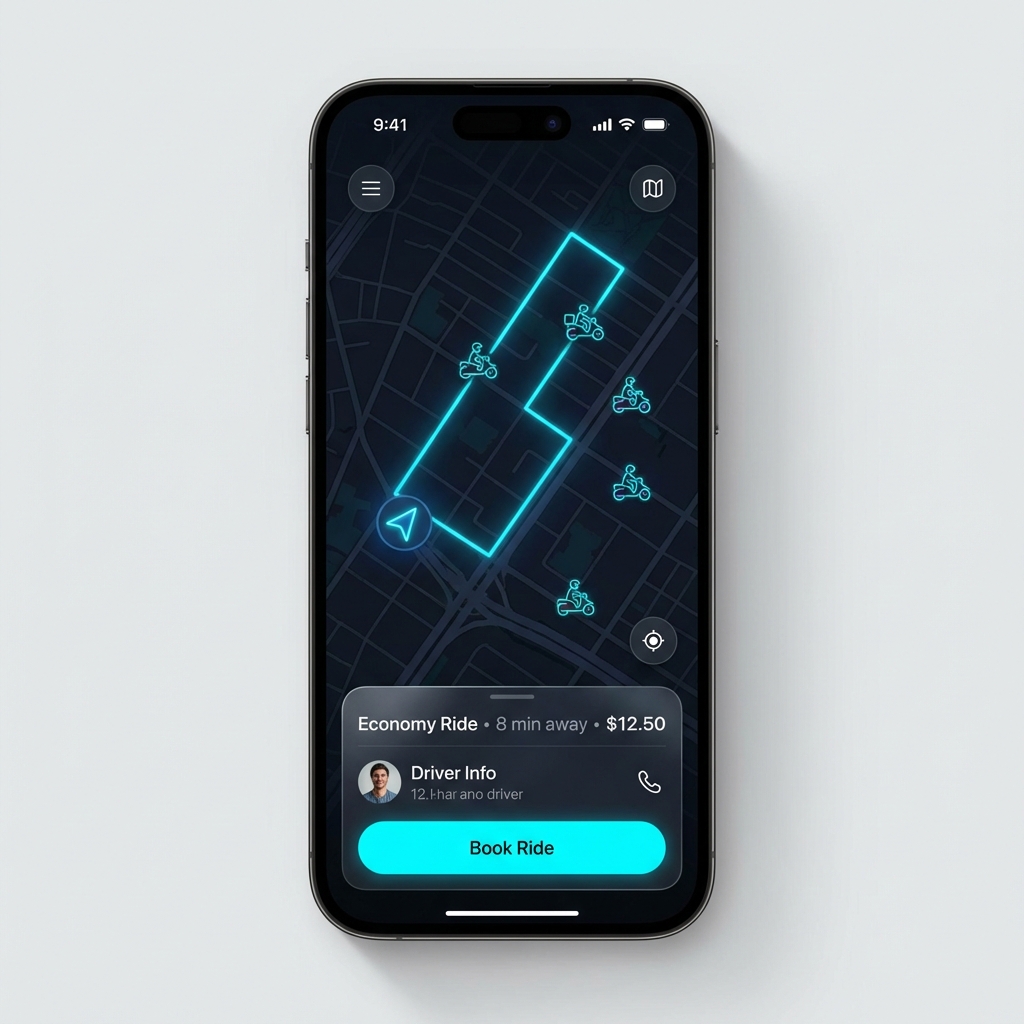
🚗 Custom Driver Markers
Instead of generic pins, we use high-performance driver icons rendered via expo-image. By using the useImage hook, we ensure that markers are cached and rendered smoothly even during heavy map movement, providing a premium "live" feel. Each driver appears as a custom bike icon on the map, making it easy to spot available rides.
📍 The API Trio: Directions, Places, and Geoapify
Mapping isn't just about visual; it's about data.
- Google Places API: Powers the input fields, allowing users to find any destination with autocomplete. As you type, suggestions appear instantly, making destination selection effortless.
- Google Directions API: Calculates the literal "path" of the ride. We use this data to determine travel time and calculate dynamic fare prices based on distance and estimated duration.
- Geoapify: Serves as our robust geocoding engine, converting coordinates to readable addresses (and vice versa) to ensure the UI always shows clear, human-friendly locations. This was crucial for displaying the current location and destination in a user-friendly format.
📲 The Expo Ecosystem: Notifications & OTA Updates
A modern app needs to stay alive in the user's pocket and evolve without friction.
🔔 Smart Notifications
Using Expo Notifications, Sarathi can alert users when a driver is assigned, when they're approaching, or when a ride is completed. The integration is handled natively, ensuring high deliverability and easy management across both iOS and Android. Push notifications keep users engaged and informed throughout their journey.
⚡ EAS Update: The Death of the "Update Button"
One of the most powerful features we implemented is Over-the-Air (OTA) updates via EAS Update. This allows us to push critical bug fixes, UI improvements, and even new features directly to users without waiting for App Store or Play Store approval.
It's a game-changer for maintaining a high-quality user experience. Found a bug? Push a fix in minutes, not days. Want to tweak the UI? Deploy instantly. This capability transforms how we think about mobile app deployment.
🧠 State Coordination with Zustand
How does the app keep track of where you are, where you're going, and which driver is yours? Zustand.
We use custom stores to coordinate everything:
- Location Store: Manages user location and destination coordinates.
- Driver Store: Tracks available drivers and the selected driver.
- Ride Store: Maintains the active ride state with real-time location updates.
For example, when a user sets a new location, the store automatically clears any previously selected driver, ensuring the state remains consistent and the user always gets a relevant ride estimate. This reactive approach keeps the UI in perfect sync with the app's state.
🛠️ The "Developer Story": Facing the Cache
No project is without its hurdles. One of the most persistent challenges during Sarathi's development was a tricky Caching Issue.
During the integration of Clerk and our custom API fetches, we noticed that stale data was occasionally causing UI inconsistencies—users would see outdated driver information or their location wouldn't update properly. Solving this required a deep dive into how useFetch interacted with the component lifecycle and ensuring that our fetchAPI utility properly handled response revalidation.
It was a classic "cache invalidation is hard" lesson, but it led to a much more robust data-fetching strategy. We implemented proper dependency tracking in our hooks and added explicit cache-busting mechanisms where needed. The result? A snappy, always-up-to-date UI that users can trust.
🗄️ Database Design: PostgreSQL on the Edge
The database schema is the backbone of any application. With Neon's serverless PostgreSQL, we get the power of a traditional relational database with the scalability of serverless architecture.
Core Tables
Our schema revolves around three primary entities:
Users Table: Stores user profiles synced from Clerk authentication. Each user has a unique clerk_id that bridges the authentication layer with our application data.
Drivers Table: Contains driver profiles including ratings, vehicle information, and availability status. This table is queried frequently to populate the map with available drivers.
Rides Table: The heart of the system. Each ride record captures:
- Origin and destination (both addresses and coordinates)
- Ride timing and fare calculations
- Payment status tracking
- Real-time location updates during active rides
- Ride status (in_progress, completed, cancelled)
The beauty of using PostgreSQL is the ability to leverage relational integrity. For example, when a ride is created, we validate that both the user and driver exist, ensuring data consistency across the application.
📡 Real-time Location Tracking: The Technical Challenge
One of the most complex features in Sarathi is the real-time location tracking during active rides. This isn't just about showing a dot on a map—it's about maintaining accurate, battery-efficient location updates that sync with the backend.
The Implementation Strategy
Using expo-location, we implemented a sophisticated tracking system:
- High-Accuracy Mode: When a ride starts, we switch to
BestForNavigationaccuracy, updating every 1 second or 5 meters of movement. - Dual Updates: Location changes trigger both local state updates (for instant UI feedback) and periodic database syncs (for persistence).
- Cleanup on Completion: When a ride ends, we properly remove location subscriptions to prevent battery drain.
This approach balances user experience (smooth, real-time updates) with system resources (battery life and network usage). The challenge was ensuring that location updates didn't overwhelm the database while still providing accurate tracking for safety and transparency.
🔒 Type Safety: TypeScript as a Foundation
In a complex application like Sarathi, TypeScript isn't optional—it's essential. We defined comprehensive type definitions for every entity in the system.
Why This Matters
Consider the Ride interface: it includes over 15 properties spanning addresses, coordinates, pricing, status, and driver information. Without TypeScript, a simple typo like origin_adress instead of origin_address could cause runtime errors that are hard to debug.
With TypeScript:
- Autocomplete: IDEs suggest valid properties as you type.
- Compile-time Errors: Mistakes are caught before the app even runs.
- Refactoring Confidence: Changing a property name updates it everywhere automatically.
We also leveraged TypeScript's declare syntax to create global type definitions, making types available throughout the entire codebase without explicit imports. This is particularly useful for frequently-used interfaces like Driver, Ride, and MarkerData.
🚢 Deployment Process: From Code to Users' Phones
Deploying a mobile app can be complex, but EAS makes it remarkably straightforward. Here's the complete deployment workflow for Sarathi:
Step 1: Environment Configuration
First, set up environment variables in the Expo dashboard:
DATABASE_URL: Neon PostgreSQL connection stringEXPO_PUBLIC_CLERK_PUBLISHABLE_KEY: Clerk authentication keyEXPO_PUBLIC_GOOGLE_API_KEY: Google Maps API keyEXPO_PUBLIC_GEOAPIFY_API_KEY: Geoapify geocoding keyEXPO_PUBLIC_SERVER_URL: Production API endpoint
The EXPO_PUBLIC_ prefix makes variables available to the client, while others remain server-side only.
Step 2: Configure Build Profiles
Our eas.json defines three build profiles:
Development Build:
- Includes Expo Dev Client for debugging
- Connects to localhost for API testing
- Fast iteration cycle
- Internal distribution only
Preview Build:
- Points to staging servers
- Internal distribution for stakeholder testing
- Includes analytics
- No debugging tools
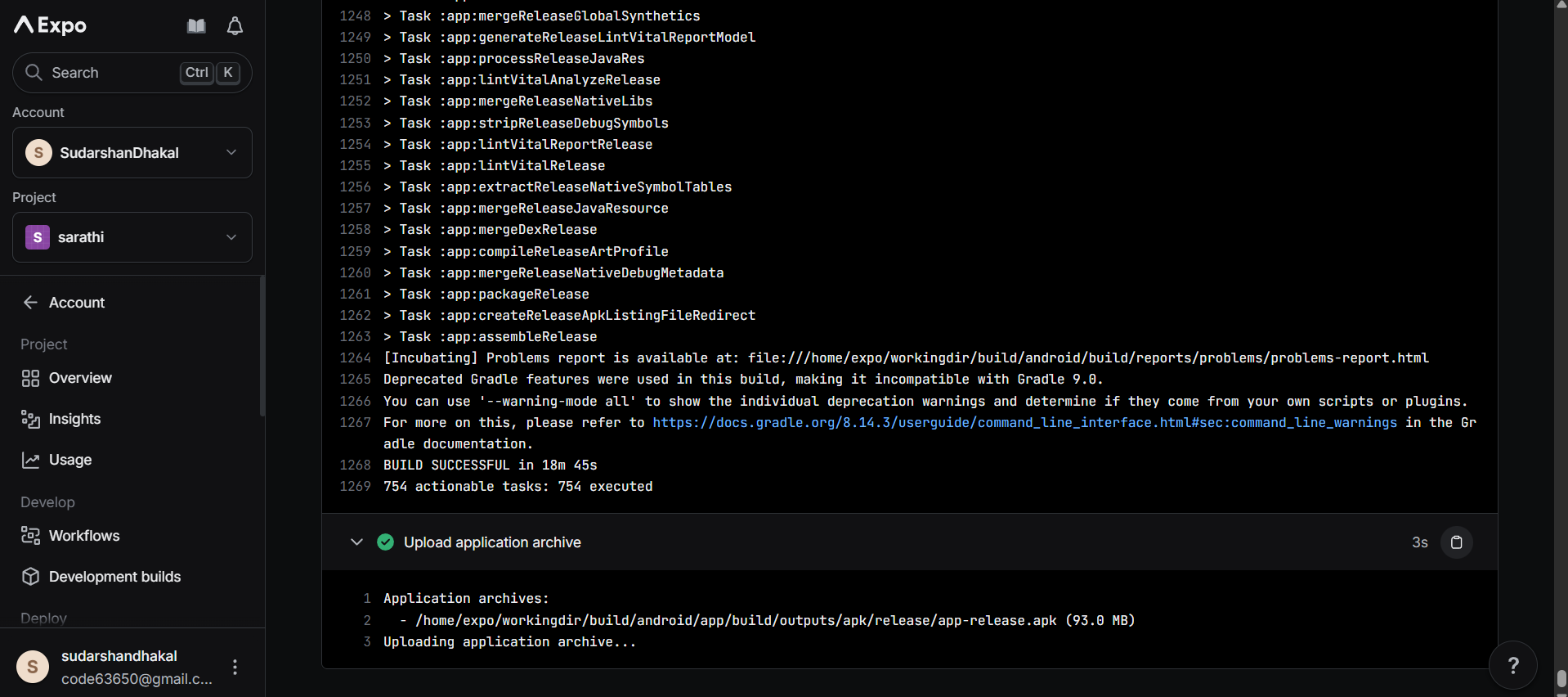
Production Build:
- Optimized bundle size
- Auto-incrementing version numbers
- Points to production servers
- Ready for app store submission
Step 3: Build the App
# For Android preview (APK)
eas build --platform android --profile preview

# For production (AAB for Play Store)
eas build --platform android --profile production

# For iOS production
eas build --platform ios --profile production
EAS Build runs in the cloud, so you don't need a Mac for iOS builds. The entire process takes 10-15 minutes.
Step 4: Test the Build
Download the preview build and test on physical devices:
- Verify authentication flow
- Test location permissions
- Check map rendering
- Validate ride booking flow
- Test push notifications
Step 5: Deploy OTA Updates
After the initial build is in users' hands, push updates instantly:
# Push update to production
eas update --branch production --message "Fixed driver marker rendering"
Users receive the update on next app launch. No app store review needed for:
- Bug fixes
- UI tweaks
- Content updates
- JavaScript/TypeScript changes
Important: Native code changes (new permissions, native modules) require a full rebuild.
Step 6: Monitor and Iterate
- Track crashes with Sentry (if integrated)
- Monitor user feedback
- Push hotfixes via OTA
- Plan feature releases
The Complete Deployment Timeline
- Initial setup: 1-2 hours (environment variables, EAS configuration)
- First build: 15 minutes (cloud build time)
- Testing cycle: 1-2 days (thorough QA)
- App store submission: 1-3 days (Apple review)
- OTA updates: 2-5 minutes (instant deployment)
This workflow enables rapid iteration while maintaining production stability.
⚡ Performance Optimizations: Making It Snappy
A ride-hailing app needs to feel instant. Here's how we optimized Sarathi:
Image Optimization
Using expo-image instead of React Native's default Image component gave us:
- Automatic caching: Images are cached on disk, reducing network requests.
- Blurhash support: Placeholder images while loading.
- Better memory management: Images are released when no longer visible.
Map Performance
The map is the most resource-intensive component. We optimized it by:
- Marker clustering: When zoomed out, nearby drivers are grouped to reduce render load.
- Lazy loading: Driver data is only fetched when the map is visible.
- Debounced updates: Location changes are batched to prevent excessive re-renders.
State Management Efficiency
Zustand's selector-based approach means components only re-render when their specific slice of state changes. For example, the driver list doesn't re-render when the user's location updates—only the map does.
🛠️ Development Workflow: Best Practices
Building Sarathi taught us several valuable lessons about mobile development workflow:
Environment Management
We use .env files for all configuration, with different values for development and production. The EXPO_PUBLIC_ prefix makes variables available to the client while keeping sensitive keys (like DATABASE_URL) server-side only.
Testing Strategy
While we didn't implement full test coverage initially, we established patterns for testability:
- Pure functions: Utilities like
calculateRegionandgenerateMarkersFromDataare easy to unit test. - Separated logic: Business logic lives in
lib/separate from UI components. - Type safety: TypeScript catches many bugs that would otherwise require tests.
Version Control
We use Git with a clear branching strategy:
-
main: Production-ready code -
develop: Integration branch for features -
feature/*: Individual features or fixes
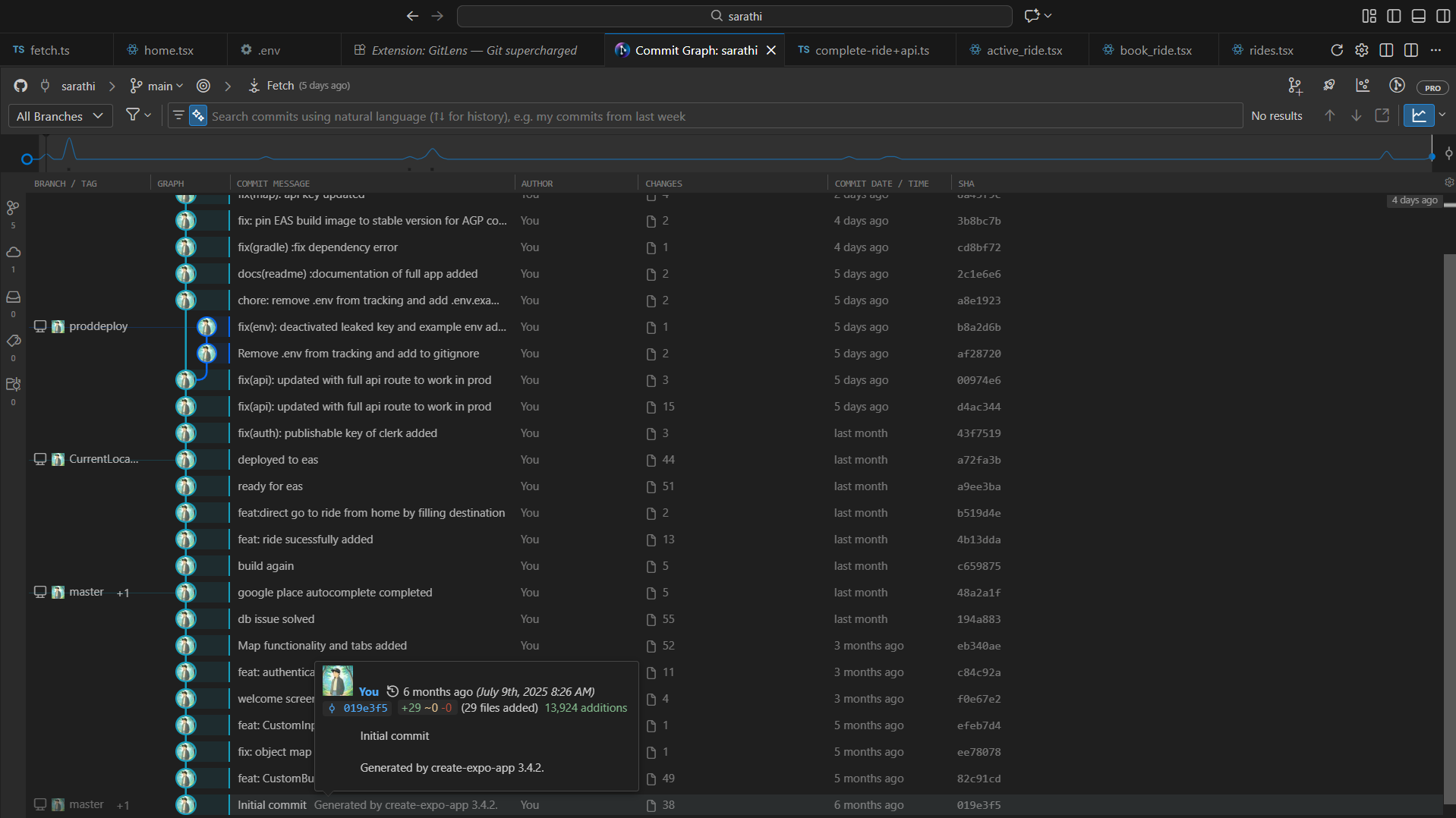
This structure works seamlessly with EAS's branch-based update system.
💡 Key Learnings & Critical Realizations
Building Sarathi taught me lessons that go beyond code. Here are the most valuable insights:
1. The Unified Codebase is a Game-Changer
Learning: Having frontend and backend in one repository eliminates so much friction.
Why it matters: No more "the backend team hasn't updated the API yet" delays. No version mismatches. No CORS headaches. Just pure productivity.
Critical realization: The +api.ts pattern isn't a hack—it's the future of mobile-first development.
2. TypeScript Saves More Time Than It Costs
Learning: Every hour spent writing types saves 10 hours of debugging.
Why it matters: In a location-based app with complex state, a typo like latitude vs lattitude could cause silent failures. TypeScript catches these instantly.
Critical realization: The declare syntax for global types is underutilized. It makes frequently-used interfaces available everywhere without imports.
3. Real-time Location is Harder Than It Looks
Learning: GPS accuracy, battery drain, and network reliability are all competing concerns.
Why it matters: Users expect real-time updates, but constant polling kills battery life. We had to find the sweet spot: 1-second updates during active rides, but only when movement is detected.
Critical realization: BestForNavigation accuracy mode exists for a reason. Use it during rides, but clean it up immediately after.
4. OTA Updates Change Everything
Learning: The ability to push fixes in minutes (not weeks) fundamentally changes how you think about deployment.
Why it matters: Found a critical bug? Push a fix during lunch. Want to A/B test a UI change? Deploy instantly. No waiting for app store review.
Critical realization: Plan your architecture around OTA updates from day one. Separate native code from business logic.
5. State Management Should Be Boring
Learning: Zustand's simplicity is its superpower.
Why it matters: Redux's boilerplate slows you down. MobX's magic can be confusing. Zustand is just hooks and stores—boring, predictable, fast.
Critical realization: The best state management is the one you don't think about.
6. Developer Experience Compounds
Learning: Every small DX improvement (NativeWind, Expo Router, TypeScript) multiplies over time.
Why it matters: Fast feedback loops mean more iterations. More iterations mean better products.
Critical realization: Choose tools that make you happy to code. You'll write better software.
7. The Cache Problem is Universal
Learning: Cache invalidation is still one of the hardest problems in computer science.
Why it matters: Stale data causes subtle bugs that are hard to reproduce. We spent days debugging why driver locations weren't updating—it was a caching issue in useFetch.
Critical realization: Be explicit about cache dependencies. Don't rely on "it should just work."
8. Test on Real Devices Early and Often
Learning: The simulator lies.
Why it matters: Location services, push notifications, and performance all behave differently on real devices. We found critical issues only after testing on actual phones.
Critical realization: The simulator is for quick iteration. Real devices are for validation.
9. Serverless Isn't Just About Cost
Learning: Serverless is about developer velocity.
Why it matters: No server management, no scaling concerns, no DevOps overhead. Just write code and deploy.
Critical realization: Neon's serverless PostgreSQL + Expo's API routes = zero infrastructure management.
10. The First 30 Seconds Matter Most
Learning: Users decide whether to keep your app in the first half-minute.
Why it matters: We obsessed over the onboarding flow—beautiful illustrations, smooth animations, clear value proposition. It shows.
Critical realization: Polish the entry points first. You can optimize internals later.
🎯 Advice for Aspiring Developers
If you're building a similar application, here are my recommendations:
-
Start with Expo: Don't go bare React Native unless you have a specific reason. Expo's ecosystem is mature and powerful.
-
Use TypeScript from Day One: Retrofitting types is painful. Starting with TypeScript is easy.
-
Choose Boring Technology: Zustand over Redux. PostgreSQL over MongoDB. Proven tools over shiny new ones.
-
Optimize for Iteration Speed: Fast feedback loops > perfect architecture. You can refactor later.
-
Embrace Constraints: Expo's limitations force you to write better code. Serverless constraints force you to think about scale.
-
Build in Public: Share your journey. The feedback is invaluable.
-
Test on Real Devices: Simulators are for development. Devices are for validation.
-
Plan for OTA Updates: Separate native code from business logic. You'll thank yourself later.
-
Read the Docs: Expo's documentation is excellent. Use it.
-
Ship Fast, Iterate Faster: Perfect is the enemy of shipped.
🏁 Conclusion
Sarathi is more than the sum of its parts. It demonstrates that by choosing the right tools—and using them to their full potential—a small team can build a feature-rich, scalable, and beautiful application that rivals industry leaders.
Whether it's the serverless backend that eliminates deployment complexity, the intelligent mapping that provides accurate ride estimates, or the seamless update cycle that keeps the app fresh, Sarathi is built for the future of mobile.
The combination of Expo's ecosystem, modern state management, and thoughtful API integrations creates an app that's not just functional, but delightful to use. And that's what modern mobile development is all about.
From the first onboarding screen to the final ride completion, every technical decision was made with both the user experience and developer experience in mind. The result is an application that's maintainable, scalable, and ready for real-world use.
Built with passion and Expo. Ready to ride into the future.